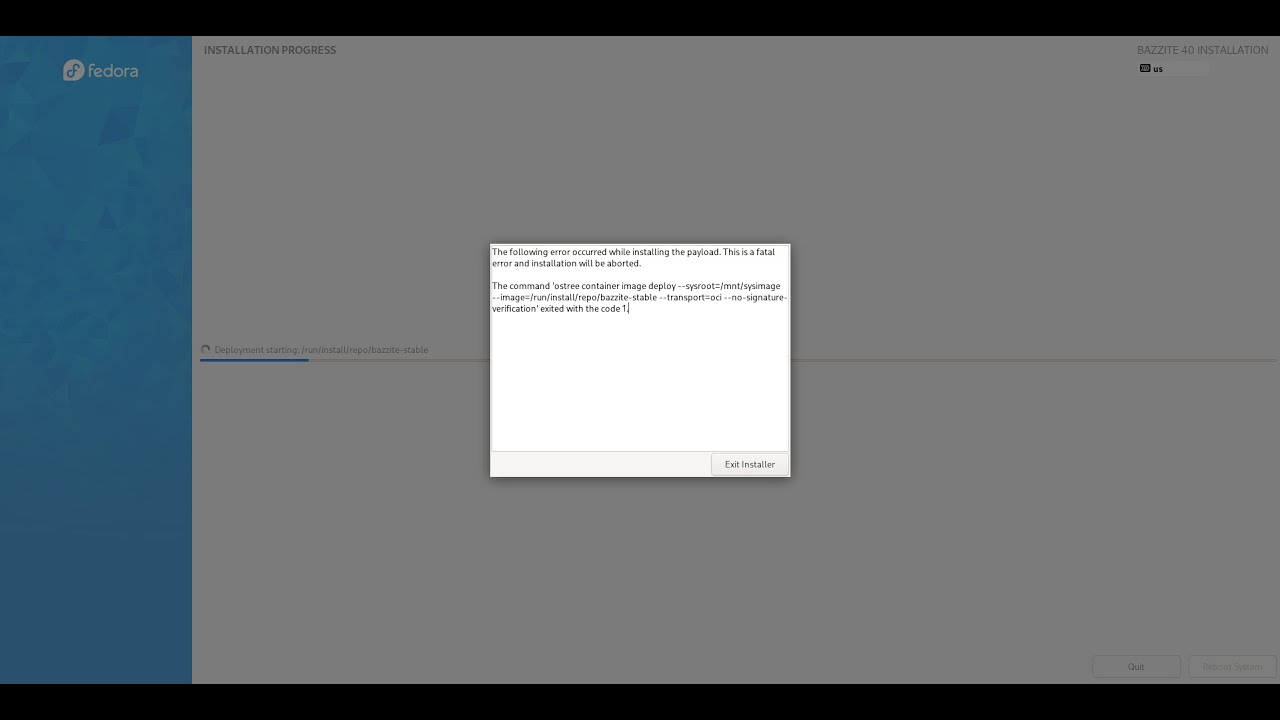
I have a fresh SSD on my Legion Go, I booted from USB to install Bazzite, it gets half way through the installation process, then I see this. I've tried two times with the same results
In this guide we'll be removing the invalid fedora entry in the efi partition to get Bazzite and other atomic desktops to install after attempting to reinstall them. (fixed the audio)
Edit: Note that you might also get this error if you previously installed Fedora workstation or Nobara and you have kept your existing efi partition on the disk. ...
What works for quite a few people is using manual partitioning, then whatever is in the EFI folder doesn't matter because you making a new EFI partition
Ah try this. Leave it on automatic. It gives you an option underneath that you need to tick to delete existing partitions. Then select remove all and just let it do automatic partitions, don't select the custom option at all
So I made a bootable USB drive with Mint, went into drive manager and completely wiped the drive of everything.
I restarted, booted into my Bazzite USB, everything looks perfect. My drive is showing 100% free.
I go through the default setup (aside user config) and I still get an exit code 1.
The one weird thing I've noticed is it seems like this EFI folder keeps getting created, and I see this second screen after failed installs. It almost seems like Lenovo firmware is mucking up the drive with this EFI partition each time before an install. I also see this screen in the second pic I never see in any YouTube tutorials.
My only last debugging idea is I'm going to boot into mint again, wipe the drive, go back to my bootable Bazzite, then confirm in terminal that EFI is empty and try once more